Boat detailing & marine service software
27°46′N 82°38′W · Tampa Bay
Your whole business, dock to desk.
- 01Get paid by text
- 02Repeat cleans on autopilot
- 03No monthly fee
Deckhand is the CRM, scheduling and payments app for boat detailers, hull cleaners and divers. Keep every customer and boat, schedule jobs and repeat cleans, send condition reports with photos, and get paid by text, on iPhone, Android and the web.
The first 25 pros pay 0% for 3 months · Questions? Talk to us · Already on Deckhand? Sign in
Screens with sample data.
What you get
Everything you need to run a boat detailing business.
Get paid by text
Send an invoice with a pay link after every job. Customers pay by card or Apple Pay, and the money goes straight to your bank through Stripe.
Automatic remindersScheduling and repeat cleans
Book jobs in seconds and put regulars on a repeat plan. Deckhand creates the next job for you and texts the customer.
Every 1–12 weeks, or by seasonCondition reports
Before-and-after photos and notes the owner sees after every job, even when they’re out of town.
Proof on every jobYour customers stay yours
Bring your whole list over in one go. We never sell your list, and other pros never see your customers.
Import a spreadsheetAn app and a website
The app on the dock, the web app on your computer. One account, so everything you do on one shows up on the other.
iPhone, Android and any browserYour day, planned
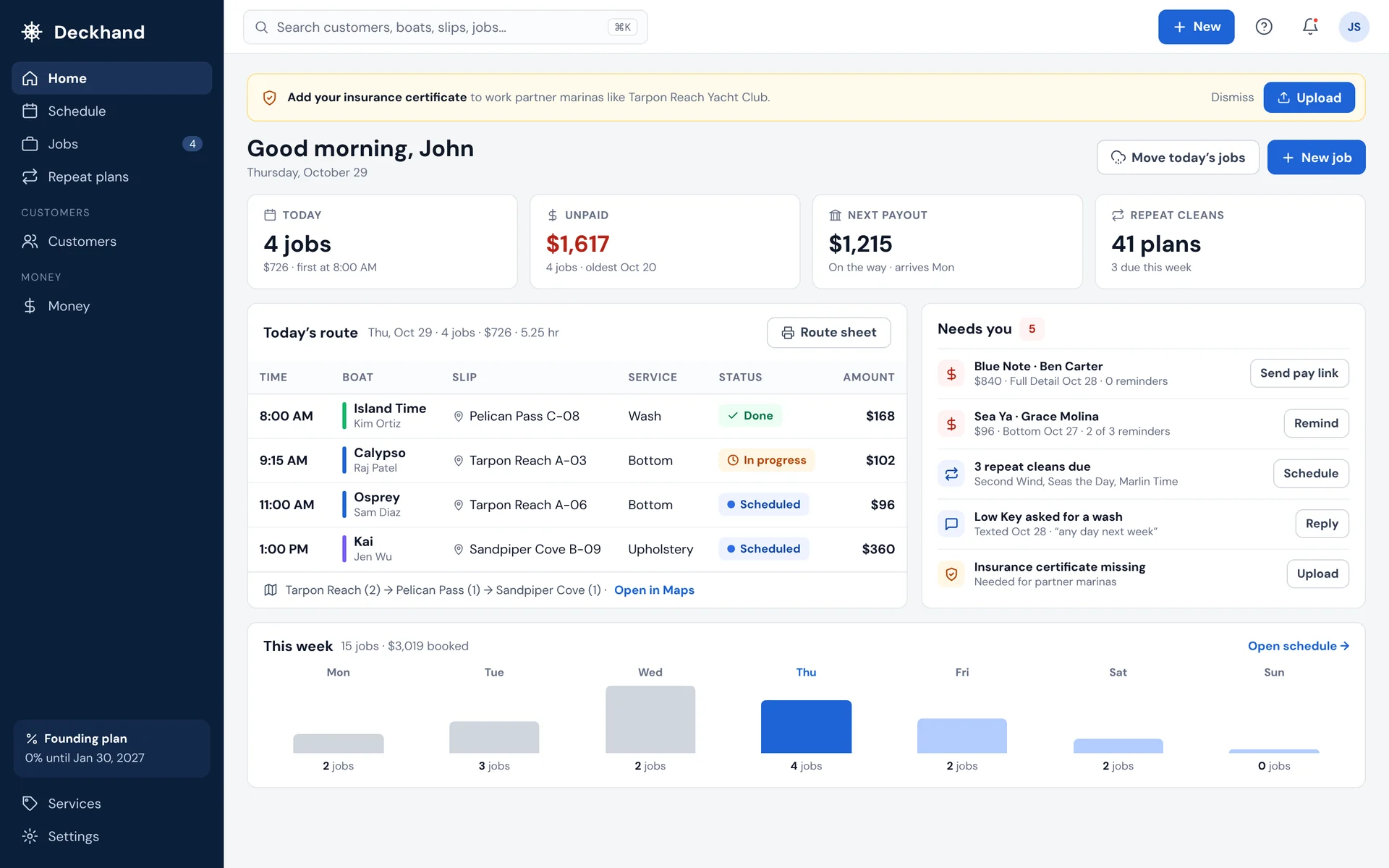
Today’s route by marina and slip, a printable route sheet, and one tap to move a day’s jobs when the weather turns.
Route sheet includedMoney in one place
What’s booked, who still owes you and every payout to your bank. Export it all for your accountant.
CSV exportMore work, when you want it
Pick up jobs from boat owners booking in the app, only when you have room, and get approved at marinas as they partner with Deckhand.
See your pay before you acceptThe app and the website
A boat detailing app for the dock. A web app for your desk.
Use the Deckhand app at the boat and the web app at home. Same account, same customers, same jobs, always in sync.
At your desk · app.deckhand-llc.com
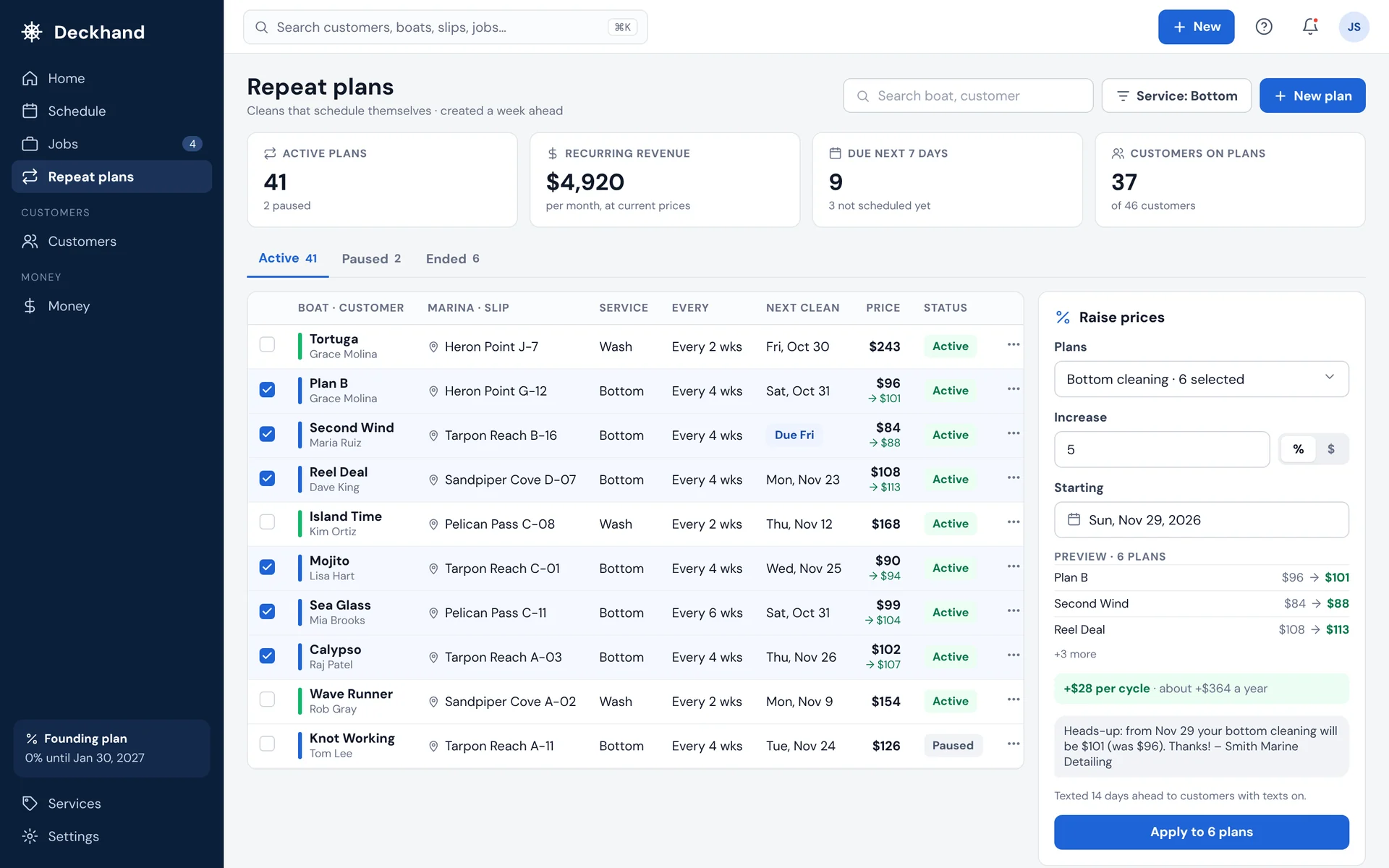
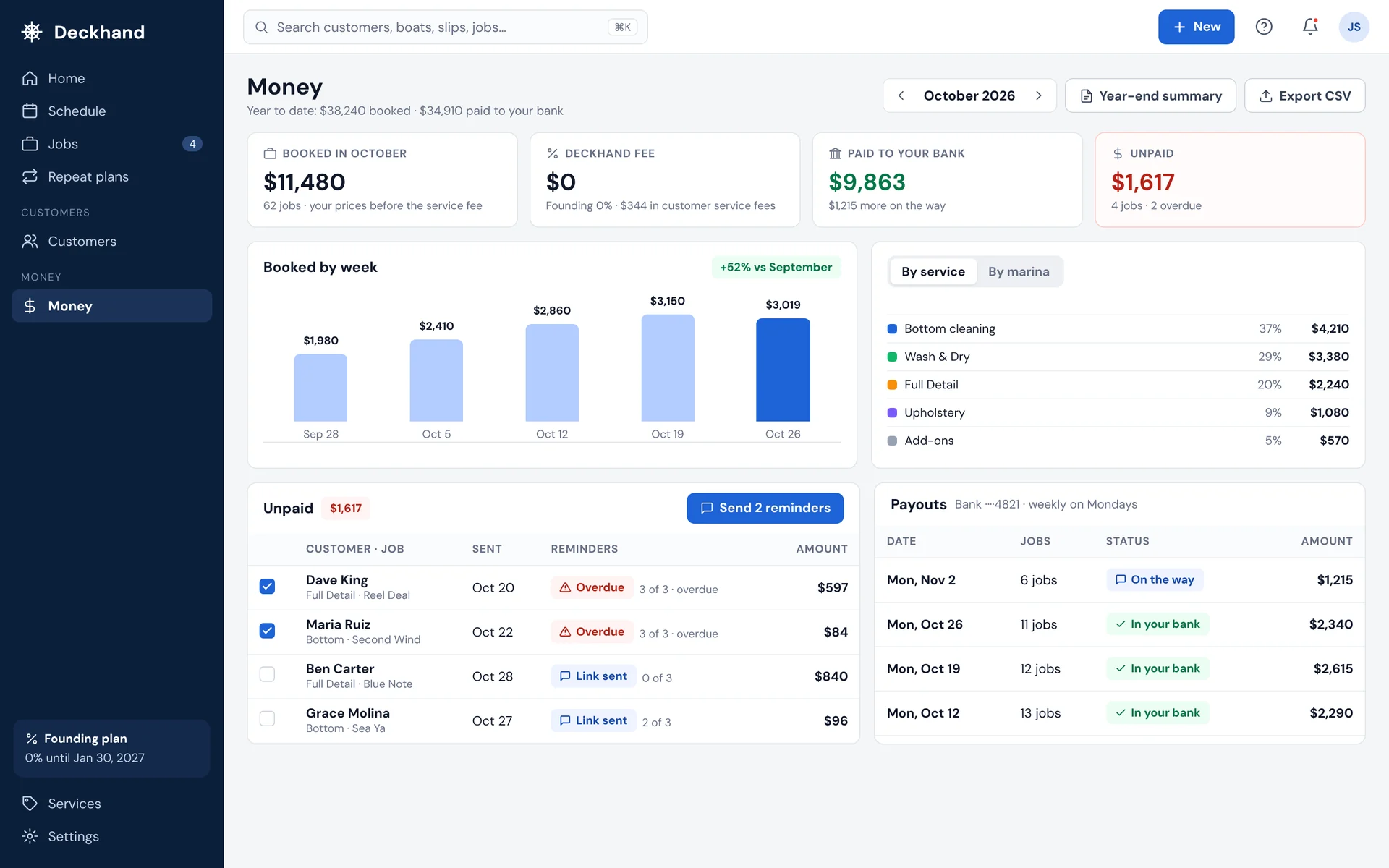
Home. Sign in to today’s route, who owes you, your next payout and the repeat cleans coming up, with what needs you on the right.
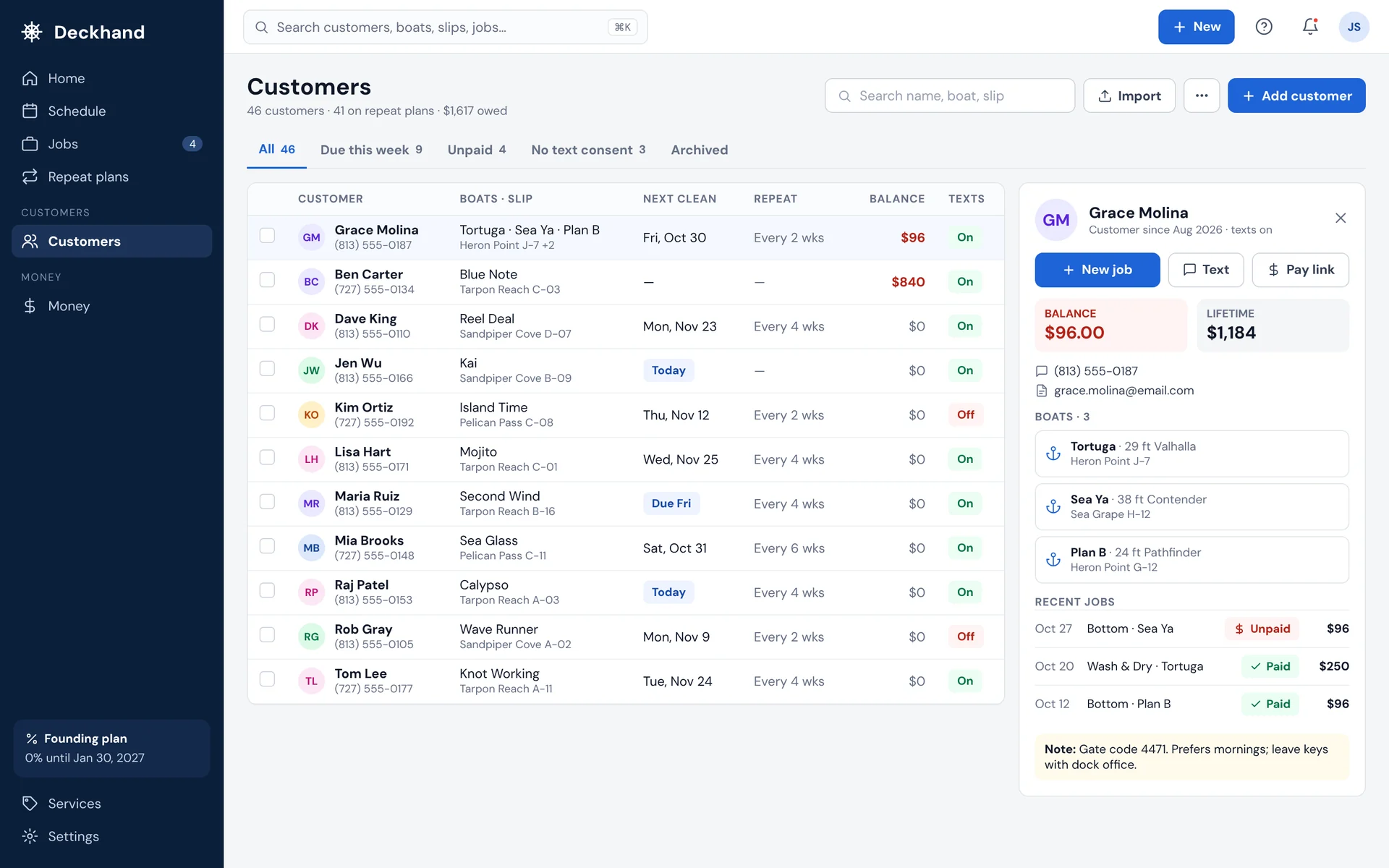
Customers. Your CRM: every customer, boat and slip in one list, with their next clean, what they owe and whether texts are on. When a customer replies to a Deckhand text, it comes to you. Import your list from a spreadsheet.
Repeat plans. Every regular on a schedule, every 1 to 12 weeks or by season. Raise prices on a group of plans and Deckhand texts your customers 14 days ahead.
Money. What you booked, what’s still unpaid and every payout to your bank. Export it for your accountant.
Screens with sample data.
On the dock · the Deckhand app
Book it, do it, get paid, right from the boat.
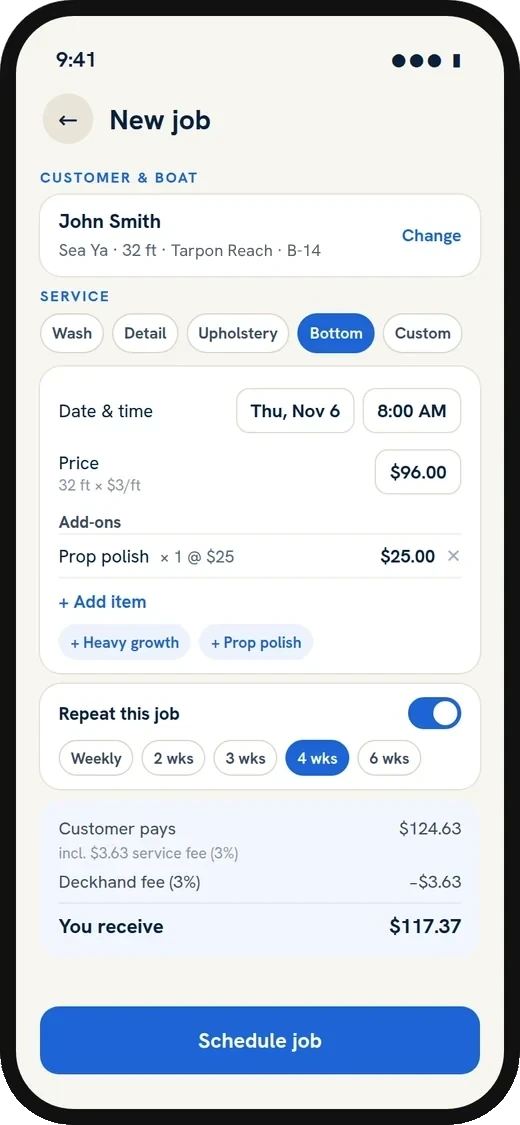
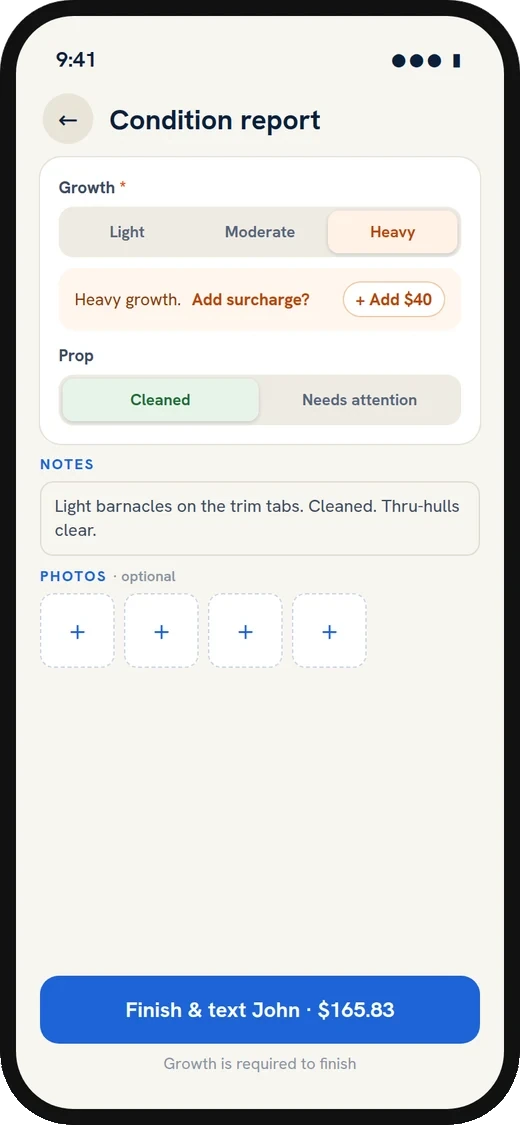
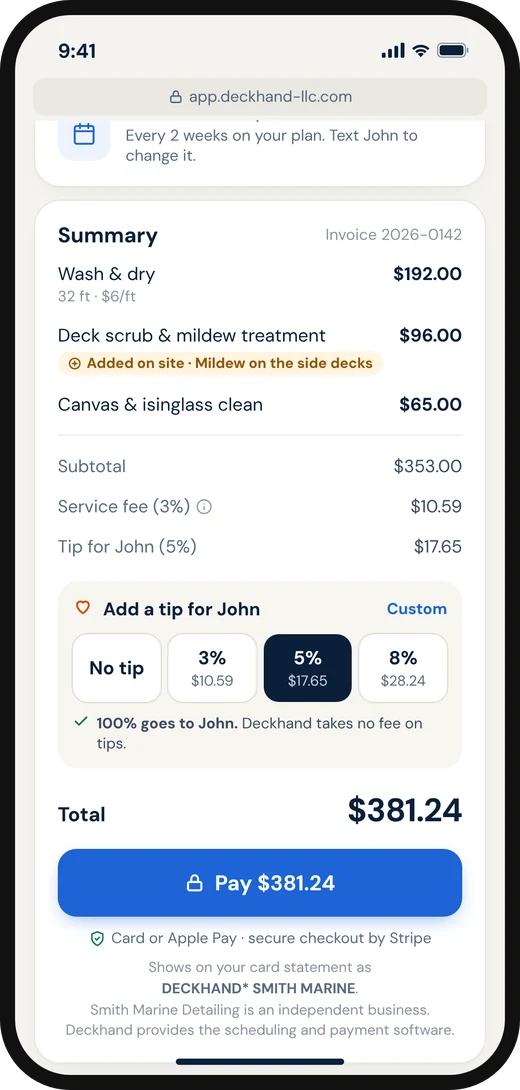
Schedule a job in seconds, log the condition report with photos at the boat, and send the owner a pay link the moment you finish.
- New jobs with add-ons and repeat schedules
- Growth, prop, zincs and notes for bottom jobs
- Finish and text the pay link in one tap
Who it’s for
Software for boat detailers, hull cleaners and divers.
Independent detailers, divers and marine service businesses, from one person with a truck to a crew working several marinas. If you do marine detailing or service work at the slip, Deckhand is built for it.
Boat and yacht detailers
Washes, waxes, ceramic coatings and interiors. Price by the foot, add extras on site, and send before-and-after photos with every bill.
Hull cleaners, bottom cleaners and dive services
Bottom cleaning and underwater hull cleaning on a schedule. Log growth, prop and zinc condition after every dive, and your customer gets the report and a pay link by text. See hull cleaning software
Pros working several marinas
Your day by marina and slip, a printable route sheet, and your insurance and marina approvals in one place.
Upholstery, boat checks and more
Turn on the services you offer and set your prices, by the foot or per visit. For anything else, book a custom job with your own description and price. It can repeat and be paid by text like any other job.
Switching from another app?
Coming from another app or a spreadsheet? Export your customers as a CSV file and import them in the web app, or book a setup call and we’ll move them with you. Setup takes about 15 minutes.
Your CRM
Six questions every detailer should be able to answer.
Most answer them from memory, a notes app and a payment app’s history. Deckhand is a CRM built for boats, with every answer in one place.
 Deckhand’s answer
Features
Invoicing, condition reports and a CRM built for boats.
Invoicing and payments
Stop chasing payments: invoices customers pay by text.
When you finish a job, your customer gets a text with the condition report and a secure payment link. No app for them to download, no cash to collect.
- Card or Apple Pay, deposited to your bank by Stripe
- Optional tips, and every cent of the tip goes to you
- Reminders sent automatically on unpaid jobs
- Every payment recorded for tax time
Built for boats
Condition reports owners actually read.
Log growth, prop condition, zinc wear and notes at the boat, add photos, and send it with one tap. For bottom cleaners and divers, it’s proof of work the owner can see from anywhere.
- Before-and-after photos
- Growth level, prop status and zinc readings for bottom jobs
- A history for every boat you service
Money
Know what you made, without the spreadsheet.
Every job, payment and payout is recorded as it happens. See what’s booked this month, who still owes you and what’s on its way to your bank.
- Unpaid jobs, with reminders already sent
- Every payout to your bank
- A year-end summary and CSV export for your accountant
Grow
More docks. More work, when you want it.
When you have room in your week, pick up jobs from boat owners booking in the app. Keep your insurance on file, and get approved in the app as marinas partner with Deckhand.
- Marina approvals in one place
- Marketplace jobs: see your pay before you accept
- Optional: take only the jobs you want
Your marinas
Sample data
How it works
How it works: from scheduling to getting paid.
Add customers
Type them in, or import your list from a spreadsheet.
Schedule
Book the job and set it to repeat. Your customer gets a confirmation text and a reminder the day before.
Do the work
Your day is laid out by marina and slip.
Send the report
Photos and notes go to the owner with a pay link.
Get paid
They pay by card or Apple Pay. Stripe deposits it to your bank.
Founding offer · first 25 pros
0% for your first 3 months.
- Months 1–30% on your own customers’ jobs
The first 25 pros to join pay no Deckhand fee on jobs with their own customers. Your customer’s 3% service fee still applies.
- After that3% per paid job
Only when you get paid, with card processing included. On a $100 job, your customer pays $103 and you get $97.
- Your customerA 3% service fee
Shown on the pay page before they pay, the same for every payment method.
- AlwaysThe software is always free
No monthly fee, no subscription and no contract. Stop anytime.
Most business software charges a monthly fee whether you work or not. Deckhand only earns when you do. Joined with another pro’s referral code? Your 3 months at 0% start automatically. Jobs have a $50 minimum, and marketplace jobs from new boat owners show your pay before you accept.
Referral bonus
$50 for every pro you bring.
Know another detailer or diver? Send them your code from Refer & earn. They get 3 months at 0%, and when they complete 5 paid jobs within 90 days, we pay you $50. Refer as many as you like.
Questions
Questions about Deckhand for detailers and divers.
What is Deckhand for detailers?
Deckhand is boat detailing and hull cleaning software for independent marine service pros: a CRM, scheduling and invoicing app in one. Detailers, divers and bottom cleaners use the phone app (iPhone or Android) at the boat and the web app at their desk to keep customers and boats, schedule jobs and repeat cleans, send condition reports with photos, and get paid by text.
What’s the best software for a boat detailing business?
It depends on how you work. Many boat detailers use a field-service app built for home services, or texts, a spreadsheet and a payment app. Deckhand is built for boats and marinas: every job is tied to a boat and where it’s kept, down to the marina and slip, prices can be per foot, bottom jobs record growth, prop and zinc condition, and the software is always free. If you work at slips and marinas, it fits how you already work.
How much does Deckhand cost?
The software is always free: there’s no monthly fee and no contract. On jobs with your own customers, Deckhand takes 3% when you get paid, and your customer pays a 3% service fee, shown on the pay page before they pay. On a $100 job, your customer pays $103 and you get $97, with card processing included. The first 25 pros to join pay 0% for their first 3 months. Jobs have a $50 minimum. Marketplace jobs from new boat owners show what you earn before you accept.
Is Deckhand a CRM for boat detailers and divers?
Yes. Deckhand keeps every customer with their boats, marina and slip, their repeat plan and next clean, what they owe, whether texts are on, and a condition report history for every boat. When a customer replies to a Deckhand text, it comes to you. Import your list from a spreadsheet and export it anytime.
Is there a scheduling app for boat detailing and repeat cleans?
Yes. Book a job in seconds in the app or the web app and put regulars on a repeat plan, every 1 to 12 weeks or by season. Deckhand creates the next job, texts your customer a confirmation and a reminder the day before, and lays out your day by marina and slip with a printable route sheet. When the weather turns, move a day’s jobs in one tap.
Is there an app for hull cleaning, bottom cleaning and dive service businesses?
Yes. Deckhand is built for divers and bottom cleaners. Dive reports record growth from clean to severe, prop, paint, shaft, rudder and thrusters, and each zinc’s wear with a predicted replacement date. Repeat plans run every 1 to 12 weeks and can slow down or stop for winter. Your customer gets the report and a pay link by text.
Can I send invoices and take card payments by text?
Yes. When you finish a job, your customer gets a text with a link to the photos and a secure pay page. They pay by card or Apple Pay with no app or account, and the money goes to your bank through Stripe. Unpaid jobs get up to 3 reminder texts.
Do my customers need an app or an account to pay?
No. They get a text with a secure pay link and pay by card or Apple Pay. There’s no app to download and no account to create.
Can I charge by the foot?
Yes. Set your rates per foot or per visit, with extra for a first clean after a long gap, wide beams or heavy growth, and add extras on site. New jobs price themselves, and you can always change the price.
Does Deckhand work on a computer?
Yes. The web app at app.deckhand-llc.com has today’s route, your schedule, customers and boats, jobs, repeat plans, services and prices, money and exports, and it stays in sync with the phone app. You can create your account on the web too.
Is there an Android app?
Yes. Deckhand is on Google Play for Android phones and on the App Store for iPhone, and the web app works in any browser.
Can I use Deckhand outside Tampa Bay?
Yes, with your own customers anywhere in the US. Marketplace jobs from new boat owners are in Tampa Bay today.
Can I move my customers over from another app?
Yes. Export your customer list as a CSV file from the app or spreadsheet you use now, and import it in the web app. You see a preview first, with duplicates and short phone numbers flagged. Or we’ll load it with you on a setup call.
Do I need insurance?
Not to run your own customers on Deckhand. Marketplace jobs and work at marinas that partner with Deckhand need general liability insurance: $1M minimum, or the marina’s minimum if it’s higher. Upload your certificate in the app or the web app. Deckhand checks it, then the marina approves you. Some marinas also require a dive certification for in-water work.
Who owns my customer list?
You do. We never sell your list, and other pros never see your customers. Partner marinas see the jobs done at their docks, and a boat’s history is shared with another pro only if the owner says yes. You can export your list at any time.
What does my customer see?
A text from Deckhand with a link to your condition report and a secure pay page. The pay page shows your business name, an itemized bill, a 3% service fee and the total before they pay, and they can add a tip, all of which goes to you. After paying, they can email themselves a numbered receipt or download it as a PDF.
What if my customers pay cash or by check?
Start with the customers who are happy to pay by link. They can pay from anywhere, even when they’re away from the boat, and reminders go out for you, so you stop chasing.
When do I get paid?
When your customer pays, the money goes to your Stripe account, and Stripe pays it out to your bank on your payout schedule. Marketplace jobs pay out 48 hours after you finish. Set up payouts once in the app; it takes about 3 minutes, and until then your payments wait for you. Every payment and payout shows in the app and the web app.
How does the referral bonus work?
Share your code or invite link from Refer & earn in the app or the web app. A pro who’s new to Deckhand and signs up with it gets 3 months at 0%. When they complete 5 paid jobs through Deckhand within 90 days, for at least 3 different customers, we pay you $50. There’s no limit on referrals. Deckhand may change or end the offer.
Can I stop?
Yes, anytime. There’s no contract and no monthly fee.
Questions or getting started
We’ll help you get started.
Have a question, or want a hand setting up? Tell us a little about your business and we’ll reply within one business day.
- 1A 15-minute call about how you schedule and get paid today.
- 2We set up your account and load your regular customers with you.
- 3Your first job on Deckhand, start to finish.
Prefer email? support@deckhand-llc.com